Package management in Juno 4.2
Juno has had a package manager for years, and it always did a fairly simple thing: you typed a name, and it fetched that one package from PyPI. If the package needed other packages, or turned out not to run on iOS at all, you found out somewhere in the middle of the install—and then worked through the dependencies by hand, one at a time. Juno 4.2 rethinks and rebuilds everything that happens between looking for a package by name and having one you can actually import.
Dependencies, worked out for you
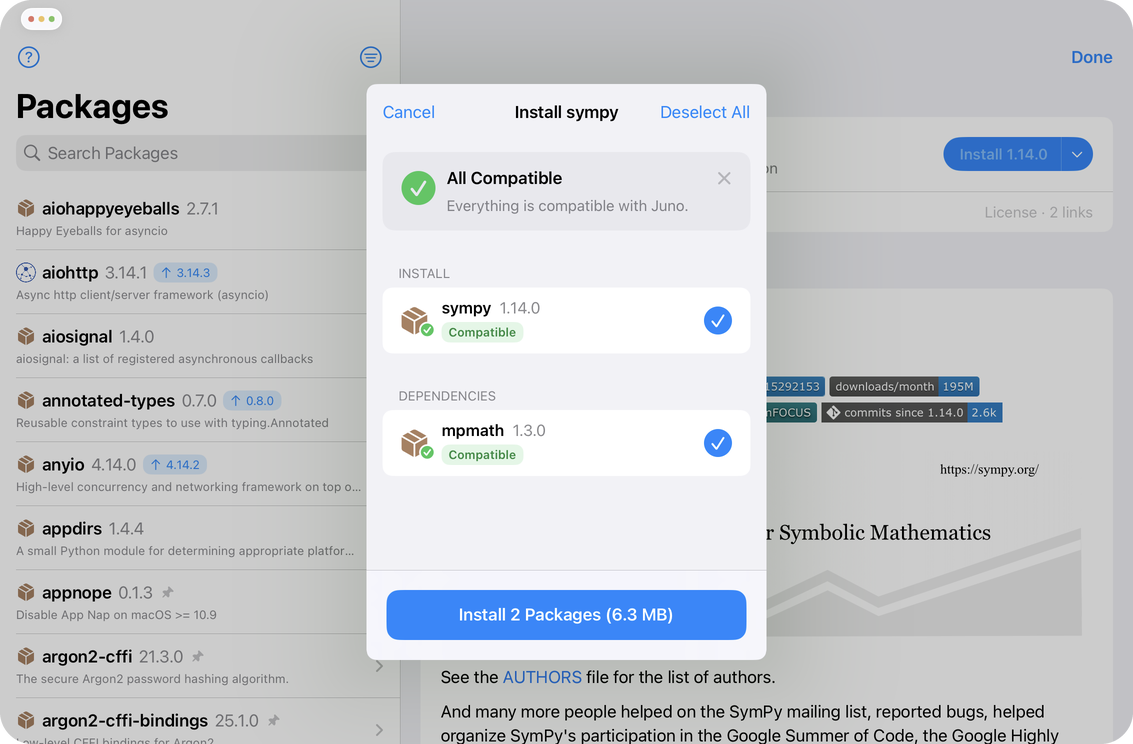
Most packages need other packages, which in turn need packages of their own. Juno now resolves that whole graph before installing anything, and shows you the result as a plan: what you asked for, what comes along with it, and what is already on your device and won’t be downloaded again. Nothing is installed until you approve the plan, and you can deselect parts of it you don’t want.
A compatibility check that runs first
Not everything on PyPI can run on an iPad. Pure-Python packages are fine; packages with compiled extensions need to be built for iOS, and Juno already ships copies of most industry-standard packages: NumPy, pandas, SciPy, OpenCV and the rest. Juno’s installation plan marks each package as compatible or explains why it isn’t—so you can decide what to skip, whether to go ahead with a partial install, or to abandon it altogether.
Projects bring their own packages
Open a project that has a requirements file and Juno offers to set it up for you—the same resolution, the same compatibility check, in one plan covering everything the project asks for at once. Packages that ship with Juno are recognized as already available instead of being downloaded again, so a project that lists half a dozen requirements often only needs to fetch one or two.
A better package page
Every package now has a proper page: what it is, which version you have installed, a list of dependencies with the version conditions they were resolved against, and the project’s own README rendered in full, much as you would see it on PyPI. Packages that have a newer release available now carry an Update Available badge, and you can filter the list to see which parts of your environment can be upgraded.
The full guide is over at Package management, and Juno 4.2 is out now on the App Store. If something doesn’t resolve the way you expected, or a package you need won’t install, tell me in the issue tracker or at [email protected]—package reports are genuinely useful, and several of them shaped this release.