Juno 4
Juno 4 is here, and it is, by some distance, the biggest update I have ever shipped. It’s been almost a year in the making: nearly 1,500 commits since the last Juno 3 release, touching just about every part of the app. Juno is still what it has always been—a native, local-first Python and Jupyter environment for iPad and iPhone. There’s just a lot more of it now!
What’s new in Juno 4
Coding Assistant
Juno now has an AI coding assistant built into notebooks, scripts and projects: you can ask questions, generate code, and review suggested changes as diffs before applying them. It’s strictly bring your own key: add your OpenAI, Anthropic or Gemini API key, and requests go directly from your device to your provider, so you stay in full control of your data, usage and costs.
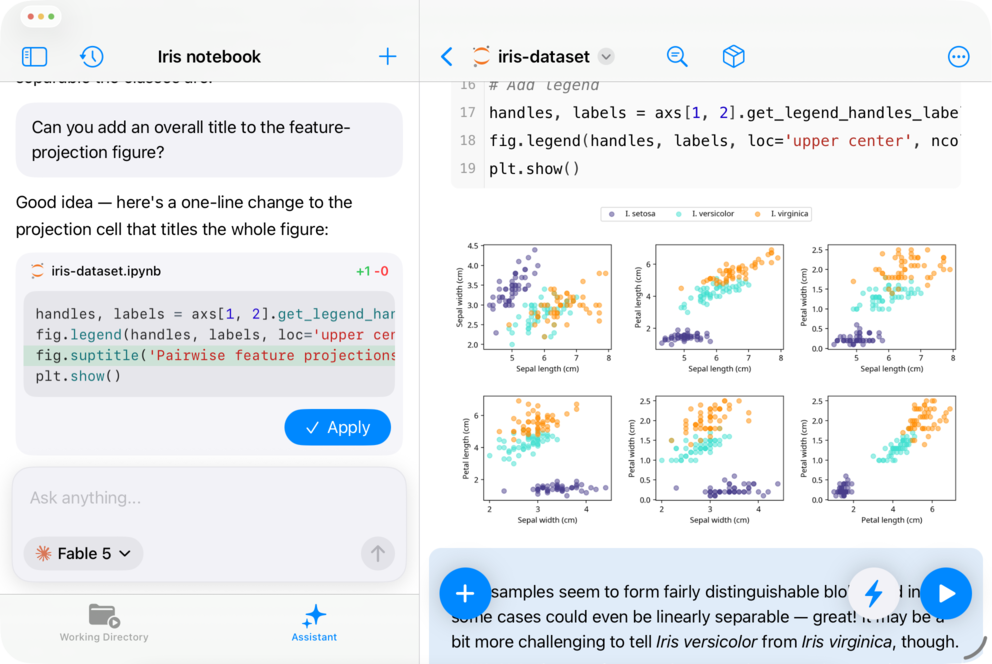
Learn more here: AI coding assistant
Python 3.13
The built-in environment jumped from Python 3.10 to Python 3.13, and every bundled package was rebuilt and updated along with it: NumPy, pandas, SciPy, Matplotlib, OpenCV, Scikit-learn, and a hundred more. This one alone took months of under-the-hood work, and it makes everything else in this release possible. Environment upgrades are no longer silent, either: when an update ships newer versions of packages you have installed, Juno now shows an Update Python Environment screen where you pick what to upgrade and what to skip—only pinned packages that Juno itself depends on always come along.
Projects, REPL and Object Inspector
There are whole new ways to run Python in Juno 4. Open any folder as a project and work across all its files in one place, with a file tree, editor tabs, and a run configuration Juno remembers. Explore interactively in a Python REPL: open one standalone, or drop into it right after a script finishes to keep working with everything it defined. And browse your session’s variables, functions and imports with Object Inspector, without sprinkling print(...) calls through your code.
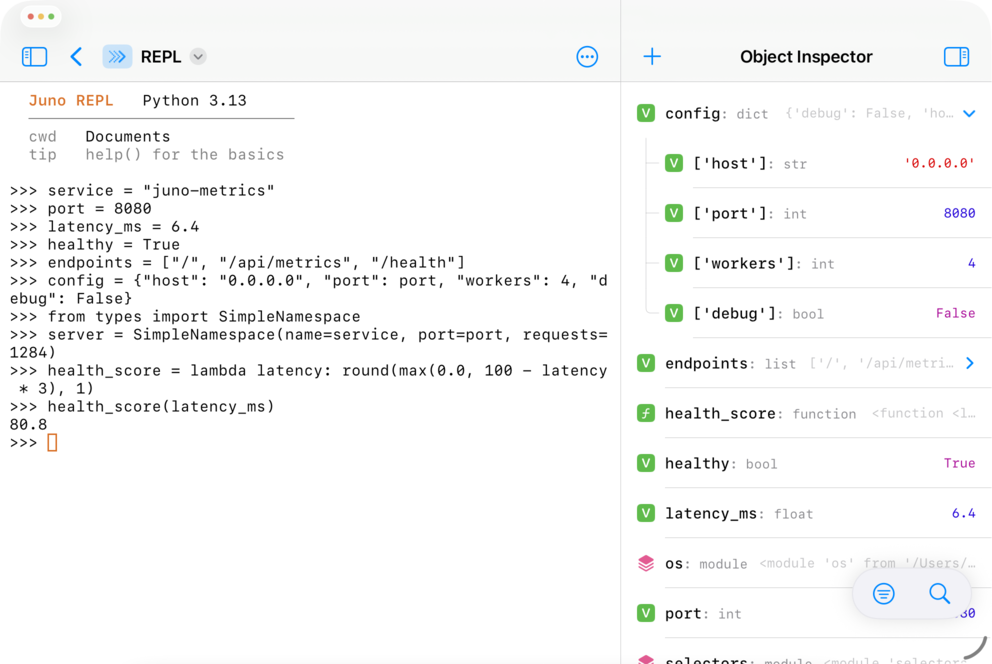
Learn more here: Working with Python scripts and projects
Python meets iOS
The new built-in juno modules let your Python code reach into iOS and device APIs: clipboard, Keychain, location, motion sensors, contacts, reminders, photos, sound, notifications, sharing, Bluetooth, native alerts and pickers, plus an Objective-C bridge to UIKit, Foundation and other frameworks. You can also run Python files and code from Shortcuts and Siri.
Background execution deserves its own mention. Persistence for running scripts is vastly improved in Juno 4: long-running scripts and Jupyter sessions keep going while you’re in another app, and you can even keep a web server started from a script running in the background.
Learn more here: Juno Python API reference
Quality of life, and a lot of it
Juno 4 also picks up a long list of things you’ve been asking for over the years: collapsible cells and auto-scrolling notebooks, a fully customizable keyboard toolbar, one unified editor for code and text files, an Output sidebar with Preview, Console, Browser and Object Inspector tabs you can keep side by side, a built-in browser for local web apps with page-source and console-log debugging, faster package search, and completely redesigned settings. Beneath all of that sits a very long tail of reliability fixes and polish: the kind of work that never makes for exciting release notes, but that you feel every day.
Free to edit, Pro to run
Juno 4 also changes how the app is priced, in your favor. Editing notebooks and files is now completely free. Running code is free to try across notebooks, scripts, projects and the REPL, and unlocks with a one-time Juno Pro purchase (no subscription, same as it has always been). And if you have ever purchased any version of Juno, Juno 4 is a free update: everything new is unlocked, with nothing more to buy.
Juno 4 is out now on the App Store, with refreshed guides for everything mentioned above over at juno.sh/docs. If you run into anything odd, or there’s something you’d love to see next, tell me in the issue tracker or at [email protected]. A lot of what’s in this release started life as one of those messages.